 Add as preferred source on Google
YouTube is a top-five retrieved source in most B2B projects we track, and 92.8% of those retrievals go to someone else's channel. Webinars are the cheapest way in.
Most B2B teams we work with already run webinars. They pick a topic, get a few hundred people to register, present for 40 minutes, answer questions live, and then put the recording behind an email gate. The registration list goes into a nurture sequence. That is usually where the asset's life ends.
We think the gate is the expensive mistake in that sequence.
Across the 21 AI-visibility projects we track in Peec AI, YouTube is one of the most retrieved sources in the answers our clients' buyers see. It ranks in the top five for 16 of them. Almost none of that goes to a channel the brand owns.
A webinar recording is the cheapest asset we know of that can change that. Below is what the data shows, the two plays we would run off the back of it, and the parts where it does not work.
Key takeaways
- YouTube took 3.05% of all source retrievals across 21 projects we track (1 May to 30 July 2026). It ranks among the top five retrieved sources for 16 of them.
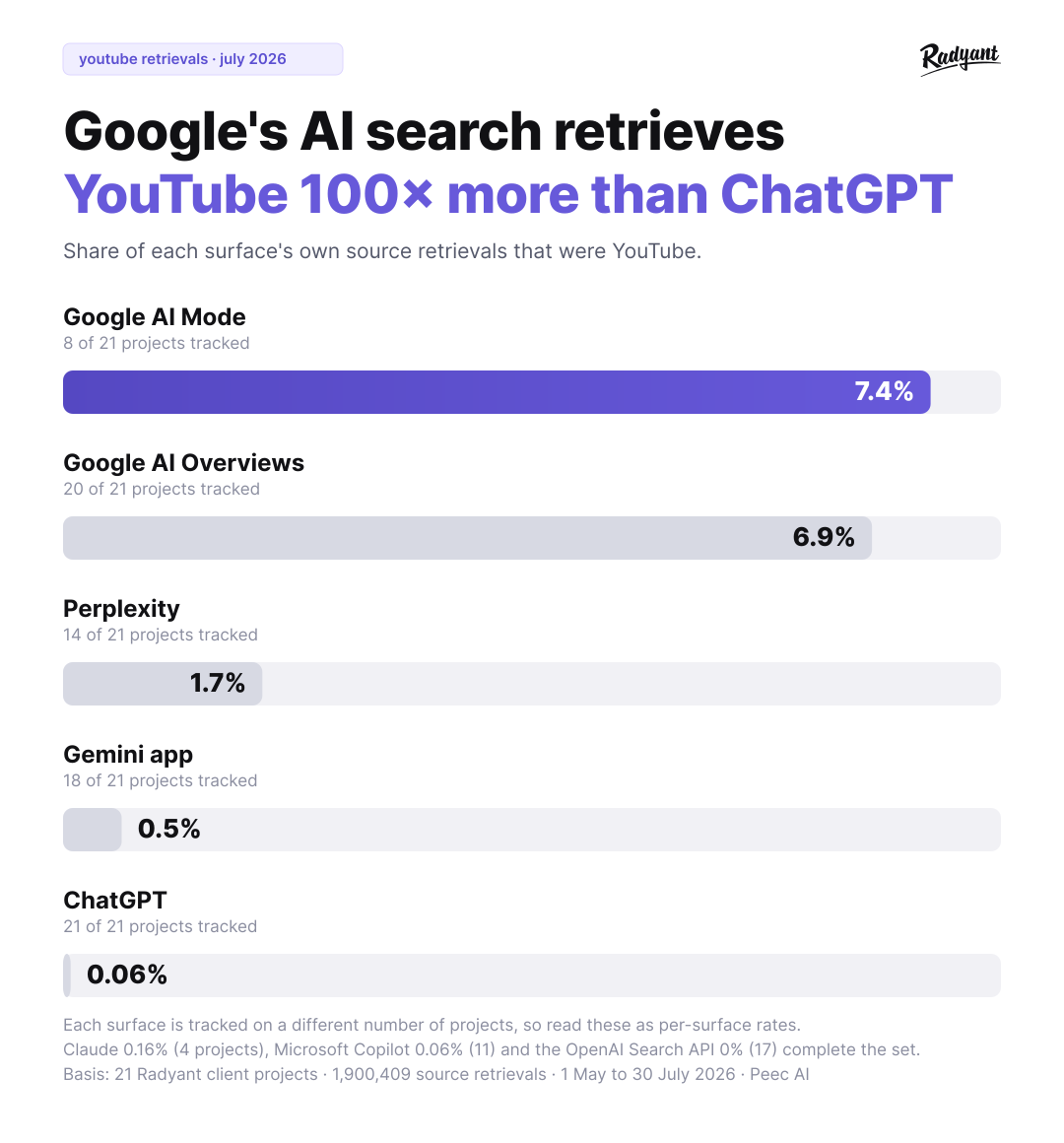
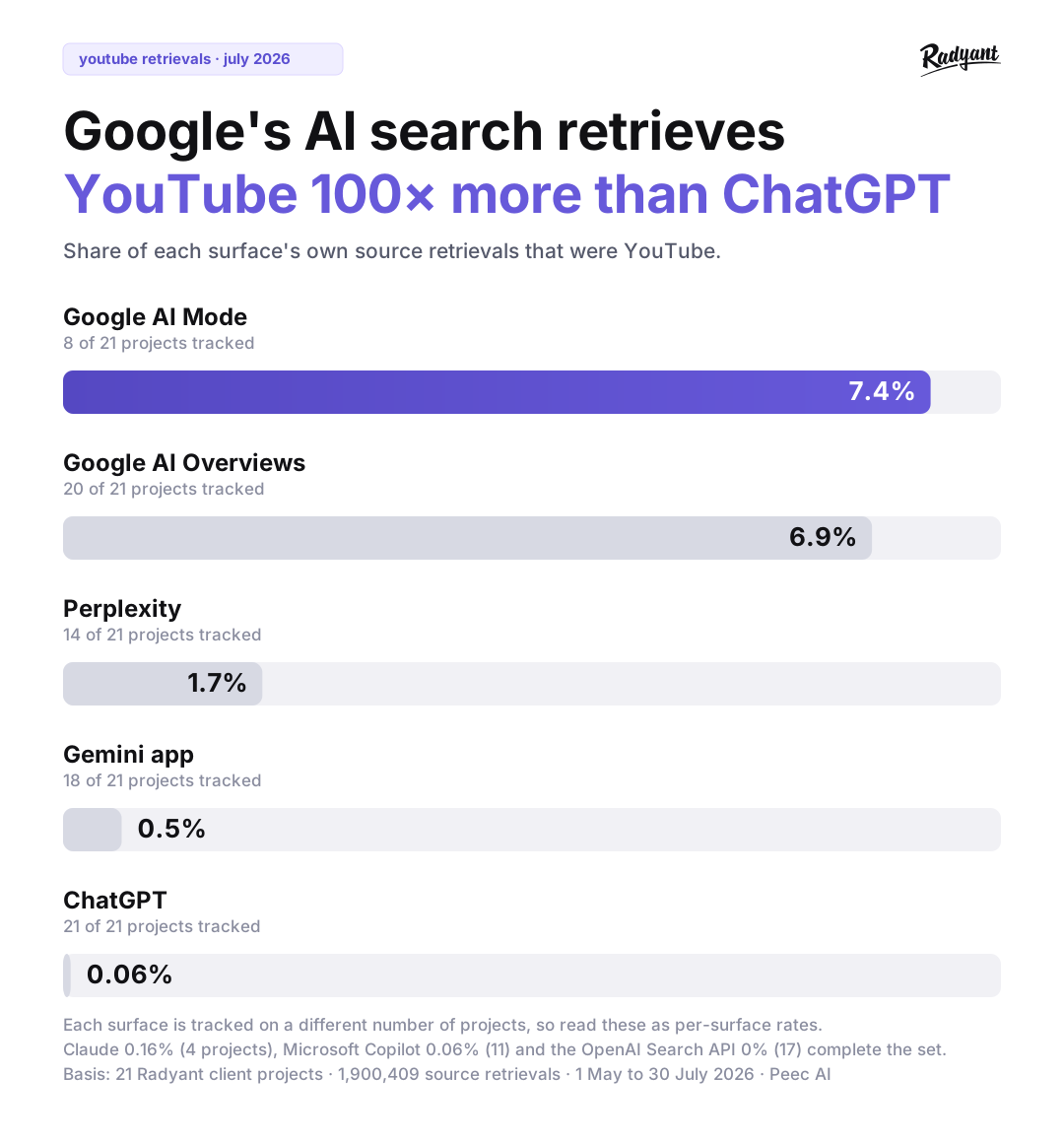
- The retrievals concentrate in Google's search surfaces. YouTube was 7.4% of retrievals in Google AI Mode and 6.9% in AI Overviews, against 0.06% in ChatGPT.
- 92.8% of those YouTube retrievals go to a channel the brand does not own. That points at two plays: publish your own recordings, and co-host with the channels already being cited.
- Citations track structure and metadata rather than views or subscribers, which is what makes this viable for a channel with a few hundred subscribers.
- Gate the live slot, publish the recording. A gated recording cannot be retrieved, so it cannot be cited.
YouTube shows up where your buyers search
We track prompt sets for each client across the AI surfaces their buyers use, and we log every source each engine retrieves to build its answer. A retrieval means the engine pulled that URL while composing a response. It is the raw input to a citation. The mechanics of building that prompt set are in our prompt tracking guide.
Pulling every retrieval from 21 projects over three months gives 1,900,409 rows. YouTube accounts for 57,901 of them. Those retrievals split very unevenly across surfaces, which is where the useful detail sits.
explore the data
The same pull, two ways. Switch the slice to see where YouTube retrievals concentrate, and who currently holds them.
YouTube share of all source retrievals
Google AI Mode
16,267 of 219,722 retrievals. The highest concentration we measured: roughly one in every fourteen sources AI Mode pulled was a YouTube video.
One caveat on reading that, because it changes how much weight each row carries. We do not track every surface on every project, so the rates rest on different bases: AI Overviews on 20 of the 21 projects and ChatGPT on all 21, but AI Mode on 8 and Claude on only 4. A share is a ratio, so uneven coverage cancels out of it, which is why we compare rates here rather than raw retrieval counts. Still, treat the AI Mode and Claude figures as thinner than the rest.
YouTube is a serious source in Google's search products. In AI Mode it took 7.4% of retrievals and in AI Overviews 6.9%, which is around one in every fourteen sources, and a lot for a single domain in a set where we counted 4,003 distinct YouTube channels.
It is also close to irrelevant everywhere else. ChatGPT retrieved a YouTube URL in 0.06% of cases, Copilot the same. Even Gemini, Google's own assistant, sat at 0.5%, which tells you this is a property of Google's search surfaces rather than of Google's models. We saw the same split in our software prompt study: source mix changes far more between surfaces than most teams plan for.
The gap between Google's search surfaces and everything else is the number worth taking away. Pooled across AI Overviews and AI Mode, 7.05% of retrievals were YouTube, against 0.06% in ChatGPT. That is a factor of over 100, and it holds even if you compare only the two best-covered surfaces.
You do not have to take that pattern on trust, and the clearest example to show is our own project rather than a client's. Filtered to Google AI Overviews over 30 days, youtube.com is the third most retrieved domain in our category, behind LinkedIn and our own site, and ahead of peec.ai. Radyant publishes very little video, which is exactly what makes it a useful example: the videos being retrieved are other people's.
Two ways into a citation slot someone else owns
Of the 57,901 YouTube retrievals, 4,193 came from one of the 27 channels the brands themselves own. That is 7.2%. The other 92.8% went to third-party channels, 3,976 distinct ones.
When we read through which videos those are, a pattern repeats across almost every project. The cited video is usually made by a partner, a reseller, an implementation consultancy, an industry association, or a direct competitor. In one enterprise maintenance-software project, the videos AI Overviews kept pulling for the client's core category were webinar recordings from two systems integrators, each explaining how to solve the exact problem the client sells software for. Some of those recordings are years old. They are screen shares with a slide deck.
Read one way, that is discouraging: the slot is taken. We read it as two separate plays, and the second one is the part most teams never consider.
Play one: publish your own recordings
The demand is proven, because the engine is already retrieving video for that question. The bar is low, because the incumbent answer is a screen share. And the company with the most product knowledge in the category is missing from the result entirely. That is a gap you can fill with a recording you were going to produce anyway.
Play two: co-host with a channel that already gets cited
The 92.8% is also a target list. Those consultancies, associations and partner channels have something you do not: a video presence the engines already trust for your category.
So instead of only publishing on your own channel, run the webinar with one of them. Bring the expert, the data and the deck, and let them host the recording on their channel. You appear in the video, your brand gets named in the title and description, and the citation lands on a channel with an existing track record instead of one you are starting from scratch.
Pick the partner from your own retrieval data rather than from follower counts. The question is which channels are already being retrieved for the questions you care about, not who has the biggest audience. A 900-subscriber consultancy channel that AI Overviews already cites for your category is worth more here than a large channel it ignores.
This is a recommendation from reading the data, not a result we can put a number on yet. We have not run enough co-hosted webinars to show you a before and after.
Why webinars specifically, and not "video content"
The advice "do YouTube" fails in B2B for a boring reason: producing studio video is slow and expensive, so it never survives contact with a marketing team's capacity. Scripting, filming, editing and thumbnails for one video can absorb a week.
A webinar inverts that. The content is generated live, by an expert who already knows the material, in a single session that was going to happen anyway. There is no script to write, because a deck and a Q&A do that work. There is no edit, because the recording is the artifact. The marginal cost of turning a webinar you already run into a YouTube asset is close to an upload and 20 minutes of metadata work.
You also do not need an audience on the platform, which is the part that decides whether any of this is viable for a company with 400 subscribers.
The clearest evidence we have for that comes from a project that was not about webinars at all. Heyflow's channel had under 1,000 subscribers, and we did not shoot a single new video. We audited the existing library against the real questions their buyers ask, then reworked titles, descriptions and chapters across 20 videos. Over three months that produced 593 brand mentions and took them from zero to 282 monthly AI Search citations, with 19 videos cited regularly. The full breakdown is in the Heyflow case.
Those were product and feature videos, not webinar recordings. What the case establishes is narrower and more useful than "webinars work": citations follow structure and metadata rather than views and subscribers. That is the assumption the webinar play depends on, and it is the part we have actually tested.
Stop gating the recording
A recording behind an email form cannot be crawled, so it cannot be retrieved, so it cannot be cited. The standard webinar funnel takes the one asset with citation potential and makes it invisible to every engine your buyers use.
The fix keeps the lead generation and drops the part that costs you nothing to drop:
- Gate the live slot. Registration for the live session is where the email exchange belongs. People trade an address for access to the expert, the Q&A, and the chance to ask their own question. That is a real trade.
- Publish the recording. Put it on YouTube, public, with proper metadata. Embed it on the relevant page of your site.
- Gate the artifacts instead. The slide deck, the template, the checklist, the benchmark data. These are genuinely worth an email and they are not citable assets anyway.
The objection we hear is that publishing the recording cannibalises registrations for the next one. We think it does the opposite, because the public recording is what people find and share, and the next live session is what they sign up for once they have seen the format. We have not measured this cleanly enough to hand you a number, so treat it as our read rather than a proven result.
How you could get started
We have run exactly one webinar on our own channel so far, so treat this as the setup we would build rather than a process we have repeated twenty times. The parts we are confident about are the metadata steps, because those are the ones the Heyflow work actually tested.
The setup is deliberately unglamorous. You do not need webinar software to start.
- Pick the topic from your own retrieval data, not from a brainstorm. Find the prompts where an engine is already retrieving video and you are not in the answer. Those are proven demand with a visible gap. This step is the difference between a webinar program that earns citations and one that produces a library nobody retrieves.
- Take registrations with a simple form. A Heyflow form works well here, or anything that captures an email and sends a calendar invite. No platform migration required.
- Run it on a normal video call and record. One expert, a deck, 30 to 40 minutes, then live Q&A. The Q&A is the most valuable footage, because it is your buyers phrasing their own questions in their own words. Keep it in.
- Write the title as the question a buyer would type. "Webinar #4: Maintenance Excellence" tells an engine nothing. Model the title on the videos already being cited for your topic, then be more specific than they are. Look at what those titles have in common before you write yours.
- Write a description that stands on its own. A short summary of the answer, the questions covered, and chapter timestamps. Timestamps matter because they give an engine a specific segment to point at rather than a 45-minute file.
- Embed it and write around it. Put the video on the page that targets the same question and write the surrounding content properly. Video and owned content reinforce each other when both get cited for the same prompt. The wider version of that idea is in our guide on getting cited in AI Overviews and ChatGPT.
- Watch your tracked prompts and iterate. Retitle and rewrite descriptions on the videos that are close but not landing. This is ongoing work, not a launch.
Steps 4 to 6 are where nearly all the value is, and they are the steps teams skip because the webinar already felt like the deliverable.
What this does not do
We are not putting webinars forward as the thing that fixes AI Search visibility, and the data does not support that reading.
It is one lever inside a portfolio. Video compounds when your owned content is already the best answer for the same question. On its own, a video library sitting next to a weak website mostly produces citations that recommend somebody else. Own the fundamentals first, which is the argument we make in our AI Search content strategy guide.
The webinar-specific evidence is still thin. We can show you that YouTube is retrieved heavily in Google's search surfaces, and that those retrievals mostly go to third parties. Those numbers are solid. When we filtered specifically for videos with "webinar", "masterclass" or "workshop" in the title, we found 120 videos pulling 796 retrievals across the 21 projects. That is real and it is small. The argument that webinars are the cheapest route into that citation slot is our reasoning plus early evidence, not a proven at-scale result. We will publish our own numbers once we have enough of them to be useful.
It is a Google play today. Reread the surface data before you plan around it. If your buyers are in ChatGPT, spend the effort elsewhere.
It does not work without a real expert. The reason a webinar recording gets cited is that somebody who knows the subject answered a hard question out loud. A marketer reading a deck does not clear that bar, and no metadata work rescues it.
If you want to know which prompts in your category are already pulling video that is not yours, and which channels are holding those slots, that is what the first pass of an audit shows. Run a free audit or book a meeting and we will look at it with you.
FAQ
Do webinars really help with AI Search visibility?
Indirectly, through YouTube. The recording becomes a video asset that Google's AI surfaces retrieve at a meaningful rate. In our data YouTube made up 7.4% of retrievals in Google AI Mode and 6.9% in AI Overviews. The webinar itself is just the cheapest way to produce the video.
Should I stop gating webinar recordings entirely?
Gate the live session and the downloadable artifacts, publish the recording. A gated recording cannot be retrieved by any engine, so it earns no citations. You keep the email capture where it actually works and stop hiding the asset that could get cited.
Do I need a big YouTube channel for this to work?
No. Heyflow's channel had under 1,000 subscribers when 20 optimized videos went from zero to 282 monthly AI Search citations. Those were product videos rather than webinars, and what the case shows is that citations track structure and metadata, meaning titles, descriptions and chapters, rather than views or subscriber count.
Is it better to publish on our own channel or a partner's?
Both, and the choice depends on your citation data. Your own channel gives you control and compounds over time. A partner or association channel that engines already cite for your category gets you into the answer sooner. Pick partners by which channels are already being retrieved for your prompts, not by follower count.
What software do I need to run a citable webinar?
Any video call tool that records, a form for registration, and a YouTube channel. Dedicated webinar platforms add convenience for large audiences and nurture flows. They are not a requirement for producing the asset.
How long should the video be?
Long enough to answer the question properly, which for most B2B topics means 30 minutes or more, with chapters. Long-form is what gets cited in our data. Shorts are close to irrelevant for this.
How do I know if a webinar earned anything?
Track the prompts your buyers actually use and watch whether your video appears as a retrieved source, then connect it to leads. Citation share on its own is a signal on the way to pipeline. Our approach to closing that gap is in the AI Search attribution guide.
How is this different from optimizing our existing videos?
It is the other half of the same job. Optimizing a library you already have is covered in our YouTube citation framework. This piece is about producing new video cheaply enough to keep going once the existing library is worked through.