 Add as preferred source on Google
How we build prompt sets at Radyant: context-rich buyer prompts at 180 to 210 characters, the mix we run for clients, and how we test each one before it goes into tracking.
Most teams setting up prompt tracking for the first time stumble over the same mistakes. They use generic prompts that look more like keywords than real conversations. They skip the most important part: testing. And they build everything around existing content. The good news: once you know what to look for, these mistakes are easy to fix. This guide walks through how we do prompt tracking at Radyant, how we build our prompt sets step by step, and how you can do the same.
Key takeaways
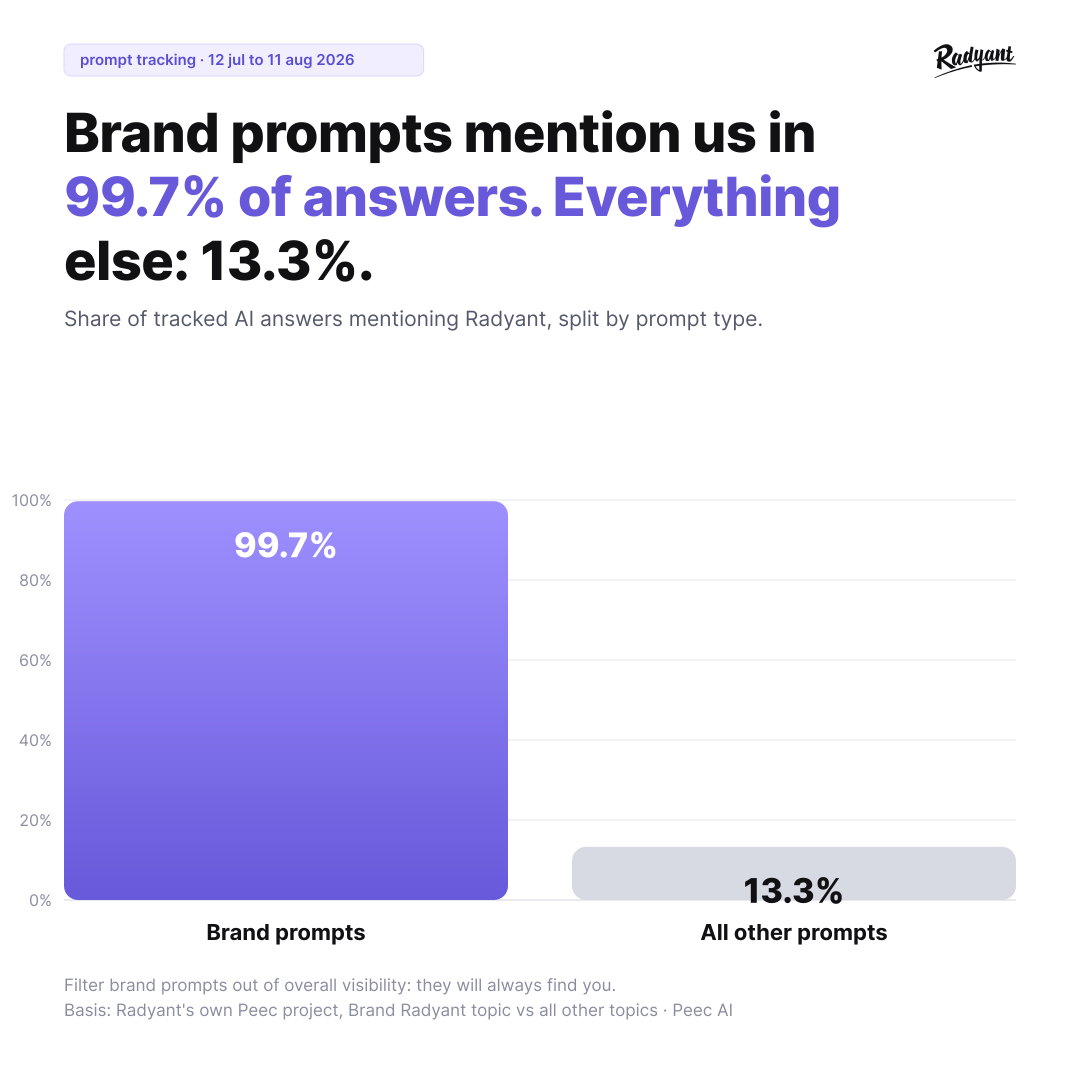
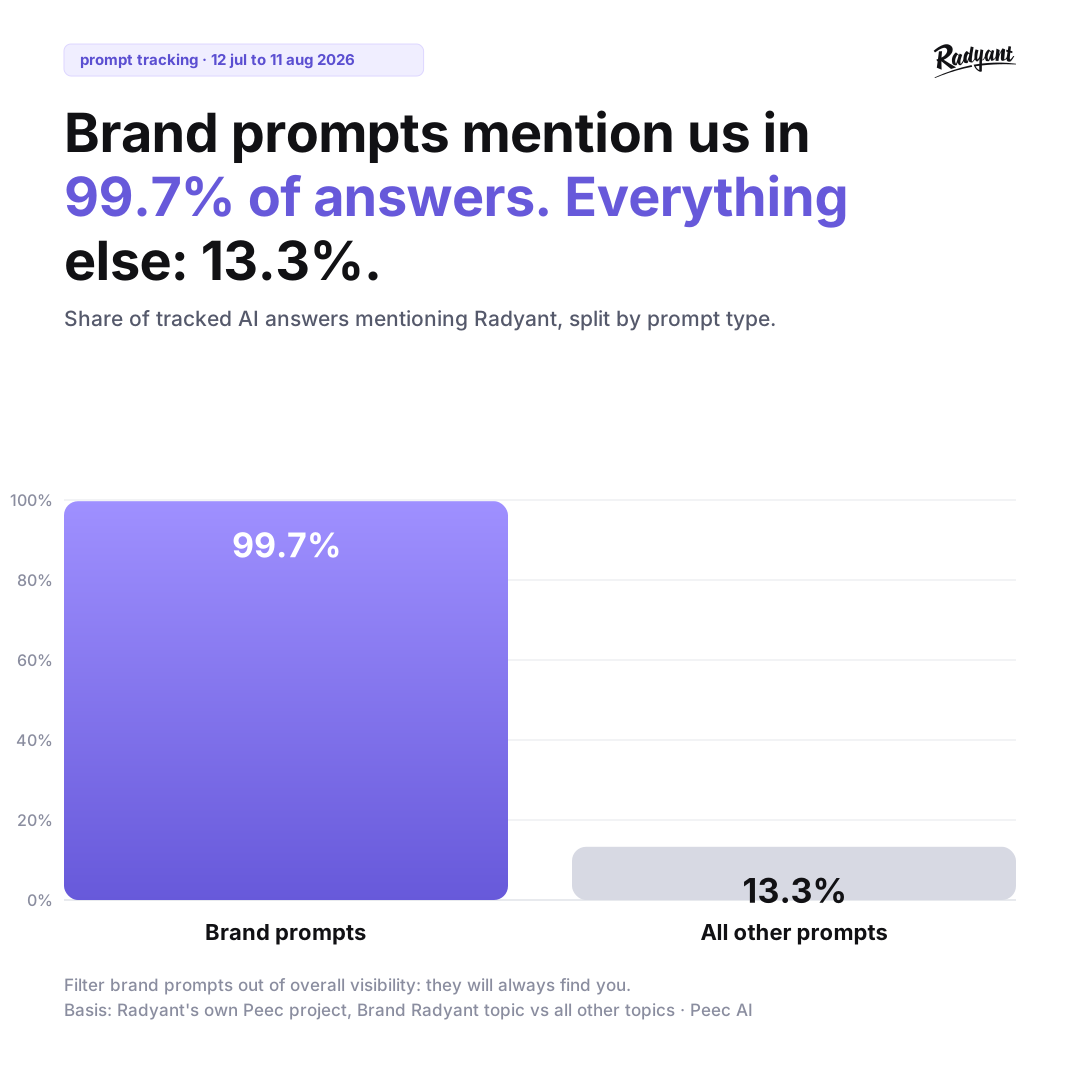
- Brand prompts inflate your headline visibility number. In Radyant's own Peec project, over a month to 11 August 2026, brand prompts mentioned us in 99.7% of tracked responses and every other prompt in 13.3%.
- A prompt that is just a keyword tells you nothing about how you show up for a real buyer. Write prompts that carry a job title, a company size and a specific pain point, then ask for a recommendation.
- Keep short prompts in the set as well as the long ones. Radyant runs 70% to 80% long context-rich prompts, 10% to 20% short-tail and 10% to 20% brand. The short ones tell you whether you count as a category player.
- The words your buyers use are not the words on your website. Nobody asks for a "go-to-market orchestration platform". Take the wording from sales calls, and pull six-word-plus queries out of Search Console.
- Test every prompt before it goes into tracking. Run each one two to three times in ChatGPT, Perplexity and Google AI Mode, and read which pages get cited rather than whether a search fired at all.
Disclaimer: At Radyant we use Peec AI as our AI Search monitoring tool, we're a Trusted Partner in their directory, and the link above is a referral link. Other tools offer similar functionality. What matters most is the quality of your prompts, not which tool you use to track them.
Common mistakes that hurt your AI Search visibility
Before we get into how to build a good prompt strategy, let's talk about what most people are doing wrong.
Using short-tail prompts with no buyer context
The most common mistake is treating prompts like keywords. A prompt like "email marketing tool" is so generic that LLMs have no idea who's asking, what the actual problem is, or which solutions would even be relevant. You'll still get brands back, Mailchimp, HubSpot and the rest, but the answer isn't tied to any real buyer context. It tells you nothing about how you'd show up for an actual prospect with an actual problem.
LLMs need context to give a situation-specific answer. Without it, you get a broad category rundown that doesn't map to any particular buyer or buying situation.
There's a second problem with keyword-style prompt sets. When a short prompt doesn't give the user what they need, they follow up. That follow-up, the one where they actually ask for a recommendation, is where the visibility decision happens, and a keyword-style set never captures it. It only tracks the opening line. In our testing, short generic prompts also trigger web search less reliably and rarely push the AI toward recommending anything.
What you want are prompts that simulate a real conversation. The kind a potential customer would actually have with an AI tool when they're trying to solve a specific problem. Think less "email marketing tool" and more: "I'm a Head of Marketing at a 50-person B2B SaaS company looking for an email marketing tool that integrates with HubSpot and helps my team run automated nurture campaigns. What would you recommend?"
That's the difference between a keyword and a prompt that works for brand tracking.
Setting up tracking before testing your prompts
Another common mistake: jumping straight into tracking without testing first. If a prompt doesn't produce relevant, helpful answers in ChatGPT, Perplexity, or wherever else you track, it shouldn't be in your setup. Full stop.
Tracking bad prompts wastes resources and gives you data that doesn't reflect real user intent. Test every prompt two to three times across all the LLMs you plan to track. Step 7 has the full routine.
Building around existing content instead of real user pain points
Many teams build their prompt strategy around what they've already written: blog posts, landing pages, product pages. The problem is that content often reflects internal language, not the way customers actually talk about their problems.
A customer doesn't search for "go-to-market orchestration platform". They ask: "How do I get my sales and marketing teams to stop working in silos?" Build your prompts around real pain points, not content titles.
There's an upside here too. If you're writing prompts for questions your audience is asking but you have no content to answer them, that's a direct signal to create it. Prompt and content strategy should inform each other.
What a good prompt looks like
The 180 to 210 character range
Across our client setups, the prompts that perform best sit between 180 and 210 characters. That's our own practice, not a study result. It's long enough to carry a persona, some company context and a specific problem, and short enough to stay focused: shorter prompts tend to come back generic, longer ones drift into answers about something else.
A simple prompt structure that works
A structure that has held up well for us looks like this:
"I'm a [job title] at a [size & type of company], and I'm looking for a solution for [problem/pain point]. Which [product/service/tool] can you recommend?"
This gives the AI three things it needs to generate a relevant answer: who is asking, what kind of company they're at, and what specific problem they're trying to solve. The final question is the call to action. It steers the AI toward recommendations rather than explanations.
A few things to keep in mind:
- Give context: Job titles and company size help the AI assess which sources and solutions are most relevant. A VP of Engineering at a 200-person SaaS company has different needs than a solo founder, and the AI will reflect that.
- Be very specific about the problem: Vague problems lead to vague answers. The more specific the pain point, the more targeted the response.
- Ask for a recommendation: Frame the question as "which tool would you recommend?", not "what is X?" You want the AI to suggest solutions, not explain concepts.
- Write like a real user: Prompts should reflect how a customer would describe their situation to an AI assistant, not how your marketing team would write it. The goal is to simulate the end of a real conversation: context explained, now asking for the best option.
- Trigger brand mentions: The whole point of prompt tracking is understanding whether your brand shows up when it should. Prompts need to be specific enough that your solution would be a natural recommendation.
Long, short-tail, brand: the mix we run
A strong setup mixes three prompt types. This is the ratio we run for clients: long context-rich prompts (70–80%), short-tail prompts (10–20%), brand prompts (10–20%).
Long standard prompts (70–80%) are your core tracking prompts. Full context: persona, company type, pain point, solution-oriented question. These reflect real user journeys in LLMs and give you the most comparable data across competitors.
A common reaction: "No one types a prompt this long." True, but we're not replicating a single message. We're simulating a full chat journey. In reality a user sends several short messages in a row before asking for a recommendation, for example "I want to create lead generation funnels quickly", then "What is a drag-and-drop solution?", then "What's the best no-code funnel builder option?" Since you can't track multi-step conversations, one context-rich prompt covers that arc. Within a single chat the model carries context from the earlier messages, so by the time the user asks for a recommendation it already knows their situation. Our prompts account for what the AI would realistically already know at that point.
Example: "Our marketing team at a mid-size company wants to create lead generation funnels quickly. We need a drag-and-drop solution. What's the best no-code funnel builder option?"
Examples of long prompts with a lot of context.
Short-tail prompts (10–20%) strip out the context. They test whether your brand shows up for core topics even without a detailed setup. If you do well here, LLMs already see you as a relevant player in your category. It's a useful read on general brand awareness.
Example: "The best no-code funnel builder"
Examples of short category-driven prompts.
Brand prompts (10–20%) ask the AI directly about your brand. What does it know? Who would it recommend your product to? What alternatives exist? These prompts show how LLMs currently describe you and where there's room to improve. When you analyze overall visibility, filter them out, because your brand will show up on them almost every time.
Example: "What do you know about [Company]? Who would you recommend it to, and what alternatives exist?"
Examples of branded prompts for sentiment tracking.
Our own numbers show how far apart the two sit. Between 12 July and 11 August 2026, brand prompts mentioned us in 99.7% of tracked responses (766 of 768), while every other prompt mentioned us in 13.3% (612 of 4,615). Averaging those together would tell you nothing about either.
Step 8 shows how to set up the topics that make this split possible.
How to build your prompt strategy in 8 steps
Step 1: Start with audience research, not keywords
This is the most important step, and the one most teams skip. You can't build effective prompts without understanding who your audience is and how they actually talk about their problems.
The best sources for this aren't keyword tools. They're your sales team, your onboarding calls, your support tickets. That's where customers describe their problems in their own words, before those words get cleaned up into marketing language.
Ask your sales team for the three most common objections and questions that come up in demos. Document the pain points in the customer's own language. Combine what you get from sales, support and onboarding calls to see the full picture.
For B2B, think about both the company and the individual. What kind of company is your ICP? And which person inside that company is actually looking for solutions?
Here's a useful reframe: your customers rarely search for your category. They search for solutions to specific problems. Someone looking for an SEO agency isn't typing "SEO agency". They're asking: "How do I get more qualified leads from Google without blowing my marketing budget?" That pain point is what you translate into prompts.
Step 2: Pull longtail queries from Search Console with a regex filter
Google Search Console is a goldmine for prompt creation, and most teams don't use it.
In the Performance report, add a Query filter, switch it to Custom (regex), and paste this: ([^" ]*\s){5,}
That surfaces queries of six or more words. Longer, more specific queries reflect high-intent searches and translate naturally into context-rich prompts. If you want a stricter cut, raise the number: {6,} gives you seven words and up.
Set your date range to at least 6–12 months to capture enough data. And don't ignore queries with fewer than 10 impressions. Even low-volume queries can reveal useful intent signals.
Pay close attention to terminology. Your customers might use different words than your internal team. If users search for "forms" and "form builder" but your content only talks about "funnels", you're losing visibility. Build prompts around both variations.
Export the data as a CSV. You'll use it later when generating prompt ideas with AI.
Step 3: Use keyword research for context, not just volume
Keyword research for prompt tracking works differently than for traditional SEO. You're not optimizing for individual keywords. You're using keyword data to understand the full thematic landscape around your product.
Start with broad seed keywords that describe your core business. Use broad match in Semrush, for example, to surface related terms and phrases across your topic area. The goal isn't the highest-volume terms. It's finding the different angles, use cases and problem framings your audience uses.
Think of keywords as context, not targets. "Sales pipeline management" isn't a prompt, but it tells you what people are thinking about, and that informs how you write one. Export the data as a CSV for the next step.
Step 4: See how real users ask questions on Reddit Answers
Reddit Answers shows you how real users phrase questions about your topic and which solutions they're recommending to each other right now.
Search for your seed keywords and collect the questions that match your target audience. Pay close attention to how people formulate their problems, those are ready-made templates for prompts. Also note which competitors get mentioned. That tells you who you're being compared to in real conversations.
But don't copy Reddit questions directly. Use them as a starting point, then add persona and company context. "What's the best tool for managing remote engineering teams?" becomes: "I'm an Engineering Manager at a 100-person SaaS company with a fully remote team. What project management tool would you recommend?"
Example of a Reddit Answers response for the question "What's the best tool for managing remote engineering teams?"
Step 5: Align your prompts with your content plan
Your content plan doubles as a roadmap for future AI Search visibility. When your prompts connect to planned content pieces, you can later measure what your content production did to your AI visibility. That's the feedback loop between what you publish and where you show up.
But don't copy content titles into prompts. "The Ultimate Guide to Revenue Operations" is not a prompt. Translate the intent behind the piece into the way a real user would ask about that topic.
Step 6: Use AI to generate prompt ideas, then refine them
Once you've gathered your audience research, Search Console data, keyword research, Reddit insights and content plan, you can use an LLM such as Claude to generate prompt ideas at scale.
Set up a Claude project with all your data: a detailed system prompt explaining the task, your content plan, the longtail queries from Search Console, the pain points from audience research, and your keyword export. The more context you give, the better the output.
Ask Claude for three variants per prompt. Then do the hard work yourself: review every suggestion, combine the best parts across variants, and adapt the language to how your customers actually speak. Claude is a tool for generating ideas, not a replacement for your judgment.
One practical note: check that your CSV files are being read correctly before you start. Ask your LLM of choice to summarize the contents of each file first. That confirms the data is being interpreted correctly and will actually inform the suggestions.
Step 7: Test every prompt before you track it
Before any prompt goes into your tracking setup, it needs to be tested. Manually. Multiple times. Across all the LLMs you plan to track. No exceptions.
Run each prompt two to three times in ChatGPT, Perplexity, and Google AI Overviews or AI Mode. Look for three things:
- Does the AI give a helpful, relevant answer? If the response is generic or misses the intent of the prompt, rework it or drop it.
- Are sources cited at all? Brand mentions can come from training data alone, but answers produced without web search are harder to influence with new content. For your pages to be cited, and for you to track what new content does over time, the AI has to pull from external sources. Perplexity and Google AI Mode search for essentially every query. The chat assistants vary by prompt, account settings and model version, so read the answer instead of assuming.
- Do the cited pages hold up? Look at what actually gets cited. If a prompt pulls the kind of pages you could plausibly appear on, category comparisons, community threads, expert posts, it's worth tracking. If it cites nothing, or only generic encyclopedia-style pages, the prompt isn't specific enough.
One signal has weakened since we first wrote this guide. ChatGPT firing a web search used to be a good sign that a prompt was complex enough to need outside research. ChatGPT now searches by default for most in-market queries, so it separates strong prompts from weak ones far less than it did. Weigh the quality of what gets cited instead.
If a prompt consistently produces generic, sourceless answers, remove it. It's not worth tracking.
Step 8: Set up prompt monitoring, topics and tags
Once your prompts are tested and ready, set them up in your tracking tool at least 7–14 days before your first reporting date. That gives you a baseline before you start drawing conclusions.
The most important thing to get right at setup is your topics and tags structure. Without it you can't filter your visibility data by theme, audience or product area, and you lose the ability to measure what an individual content piece or campaign did.
Topics are for broad themes: audience segments, large topic areas, or a dedicated topic for brand prompts. In our own project we keep it simple and use the prompt types themselves: Long Prompts, Best, Alternative to, and Brand Radyant.
Tags are for narrower filters: individual pain points, product features, use cases or campaign themes. We also tag every prompt as branded or non-branded, which is the split you'll reach for most often.
With topics in place, every visibility view can be filtered down to one of them. That's how you read visibility per prompt type, and how you keep brand prompts out of your headline number.
Get your topic and tag structure right from the start. Changing it later means losing comparability in your data.
Then put a kick-off review in the calendar for two to four weeks after go-live, with whoever owns the reporting and whoever knows the customers. Read the first responses prompt by prompt: cut the ones that come back generic or sourceless even though they tested fine, fix the wording where the intent misses, and confirm the rest. Prompts that tested well can still underperform once real tracking data arrives, which is why the set keeps moving after launch.
The checklist before you start tracking
Before your prompt set goes live, run through this list:
- Prompt structure and best practices reviewed
- Audience research completed (ICP, pain points, sales call insights)
- Search Console longtail queries analyzed
- Semrush keyword data integrated
- Content plan considered (mix of existing and planned content)
- Reddit Answers searched for relevant keywords
- Claude project set up with all data (CSV format verified)
- 3 variants per prompt generated and reviewed
- Prompts tested 2–3 times in ChatGPT, Perplexity, and Google
- Prompts set up in the tracking tool (ideally 7–14 days before the first report)
- Topics and tags assigned for filtering
- Kick-off review scheduled for two to four weeks after go-live
- Prompts adjusted or confirmed after that review
If you can check every box, your prompt set is ready. If not, go back to the step where the gap is. The quality of your tracking data depends on the quality of the prompts going in.
System prompt for prompt creation
Use this as a starting point and adjust it to your context. It generates the long prompts and the brand prompts. Short-tail prompts aren't in the template on purpose: they're a few words each, so write them by hand and add them separately.
# System Prompt for Prompt Creation

## Objective
Create a list of **30 context-rich prompts** (180–210 characters) that we will track in Peec AI for **[Company/Brand]**. Additionally, create **5 brand prompts** that directly ask about [Company/Brand].

## Prompt Requirements

### Structure & Context
Each prompt should contain the following elements:
- **Persona/Job Title**: Who is asking the question?
- **Company Context**: Size & type of company (based on ICPs)
- **Problem/Pain Point**: Specific challenge or situation
- **Solution-Oriented Question**: Trigger for brand mentions where possible

**Recommended Structure:**
> "I'm a [job title] at a [size & type of company], and I'm looking for a solution for [problem/situation]. Which [product/service/tool] can you recommend?"

### Specifications
- **Length**: 180–210 characters per prompt
- **Language**: [German or English, depending on target market]
- **Number of Suggestions**: 3 variants per prompt
- **Brand Mention Trigger**: Question should provoke possible providers/solutions

## Data Sources & Integration

### 1. Company Context
- **Basic Information**: [Insert link to company website]
- **Onboarding Document**: Read the provided document carefully. It contains important information about:
  - ICPs (Ideal Customer Profiles)
  - Target audience pain points
  - Product details & unique selling propositions
  - Industry context

### 2. Content Plan
- **Integration**: Use the topics defined in the content plan as a basis
- **Paraphrasing**: Do NOT copy topic names 1:1, but formulate them realistically like a user who:
  - Is researching information about this topic
  - Is looking for a solution to a related problem
  - Has a specific challenge in this area
- **Goal**: Content pieces should appear as relevant sources or trigger brand mentions

### 3. Search Console Data (CSV)
- **Longtail Queries**: Identify actually used search queries with clicks & impressions
- **Terminology Analysis**:
  - Which terms do potential customers actually use?
  - Are there differences from "official" technical terminology?
  - **In case of deviations**: Create separate prompt variants with both term variations and briefly comment on the differences

### 4. Keyword Research Data (CSV)
- **Source**: Semrush Broad Match keyword data export
- **Purpose**: Understand thematic relevance and different facets of topics for broad coverage
- **Usage**:
  - Identify related terms and phrases beyond the core business keywords
  - Look for thematic relevance rather than just search volume
  - Use keyword context to inform prompt formulation
  - Combine keyword insights with pain points and user intent
- **Integration**: Transform keywords and their context into natural, conversational prompts

### 5. Reddit Answers Insights
- **User Questions**: [Provide relevant questions from Reddit Answers related to seed keywords]
- **Common Themes**: [Note recurring topics and pain points from questions]
- **Competitor Mentions**: [Which solutions/tools are being recommended in answers]

**Usage**: Use the question formulations from Reddit Answers as templates for prompts, enhanced with persona and company context.

## Output Format

### Standard Prompts (30 pieces)
For each prompt, create **3 suggestions** in the following format:
```
**Theme/Topic**: [Thematic reference]

**Variant 1** (XXX characters):
[Prompt text]

**Variant 2** (XXX characters):
[Prompt text]

**Variant 3** (XXX characters):
[Prompt text]

**Notes**: [Optional: terminology differences, special considerations]

---
```

### Brand Prompts (5 pieces)
Additionally create **5 prompts** that directly ask about [Company/Brand], each with **3 suggestions**:

**Example Structure:**
- "What do you know about [Company/Brand]? Who would you recommend the product/solution to and why?"
- "For which use cases is [Company/Brand] particularly suitable? What alternatives exist?"
- "What are the strengths and weaknesses of [Company/Brand] compared to other providers?"

## Important Notes

### Realistic Formulation
- Prompts should reflect natural conversations in LLMs
- Consider user journey: The final prompt can combine multiple chat messages
- Use authentic language, no generic marketing phrases

### Pain Point Orientation
- Use the pain points from the onboarding document
- Formulate problems as customers would actually describe them
- Focus on conversion-relevant situations

### Avoid
- ❌ Generic formulations without context
- ❌ Keyword stuffing or unnatural language
- ❌ 1:1 adoption of content plan titles
- ❌ Ignoring actual user terminology from Search Console

### Testing Preparation
The created prompts will later be tested in the following LLMs:
- ChatGPT (with Web Search)
- Perplexity
- Google AI Overviews / AI Mode

Formulate the prompts so they trigger relevant, helpful answers there.

---

**Now start with prompt creation based on the provided data sources.**
FAQ
What is prompt tracking?
Prompt tracking means running a fixed set of prompts against AI engines like ChatGPT, Perplexity and Google AI Mode on a schedule, then recording whether your brand gets mentioned, how it's described, and which sources get cited. It's the AI Search counterpart to rank tracking, with prompts instead of keywords.
How long should a tracked prompt be?
The prompts that perform best across our client setups sit between 180 and 210 characters, which is our own practice rather than a study result. That's enough room for a job title, company context and a specific problem, plus a question that asks for a recommendation.
How many prompts should I track?
Our reusable system prompt generates 30 long prompts plus 5 brand prompts, and our own tracked set is 35 prompts. That covers the main topics and personas without making manual testing impractical. Every prompt gets tested by hand before it goes in.
Why filter brand prompts out of visibility reporting?
Because they saturate. In our own Peec project, brand prompts mentioned us in 99.7% of tracked responses between 12 July and 11 August 2026, every other prompt in 13.3%. Averaging the two inflates your overall number. Give brand prompts their own topic and read them for sentiment and positioning instead.
How soon can I read the tracking data?
Set your prompts up at least 7–14 days before your first reporting date so you have a baseline. Then plan a kick-off review two to four weeks after go-live: cut prompts that come back generic or sourceless, fix the wording where the intent misses, and confirm the rest.
Do I need Peec AI to do this?
No. We use Peec AI and we're a Trusted Partner in their directory, but other monitoring tools offer similar functionality. The quality of your prompt set matters more than the tool that tracks it.